
Looking for your own ARK server hosting? Configure your server and be online in minutes. All of our servers include crossplay between the Steam and Epic Games versions.
Enabling crossplay
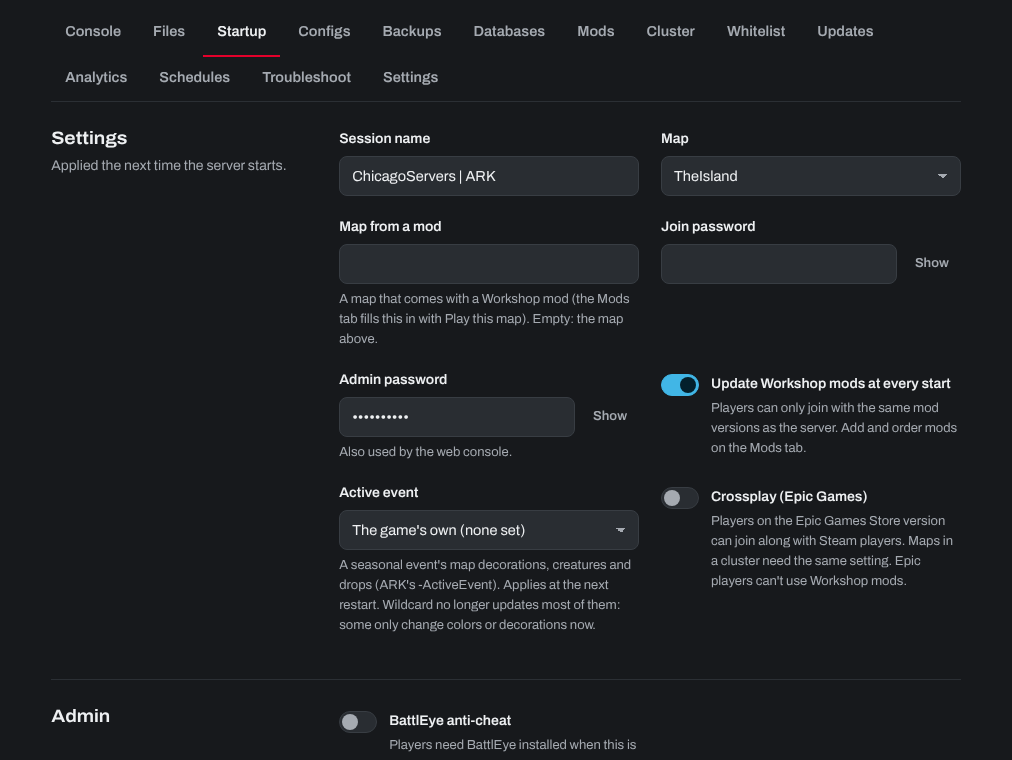
Crossplay lets players on the Epic Games version of ARK: Survival Evolved join your server along with Steam players.
- Sign in to the control panel at panel.chicagoservers.co and open your ARK server.
- Open the Startup tab and turn on Crossplay (Epic Games).
- Click Save startup, then Restart at the top of the page.
Mods: the Epic Games version of ARK can't use Steam Workshop mods, so Epic players can't join a server that runs mods. For crossplay with Epic players, run the server without mods.
Clusters: if your ARK servers are in a cluster, crossplay needs to be on for all of them or none: a map with crossplay knows players by their Epic ID, so a survivor uploaded on a map without it can't be downloaded on one with it. Turn it on (or off) for every map in the cluster, then restart them. The Cluster tab's Check the cluster warns you if they don't match.
To join from the Epic Games version, see How to connect to your Ark Server using Epic Games Version If Epic players still can't find or join the server with crossplay on, open a support ticket.
Need help? Open a support ticket and we'll take a look.