
Game servers don't update themselves the way games in your Steam library do. When a game update comes out, players on the new version can't join until your server has it too.
Updating
- Sign in to the control panel at panel.chicagoservers.co and open your server.
- The Steam update bar at the top of the page says when a new version is out. Click Update now. If the server is running, it stops for the update and starts again by itself.

To update at a set time (for example right after a weekly update), add a task with the step Update the game (Steam) on the Schedules tab. Games that aren't on Steam have an Update button at the top of the page instead.
Switching versions (branches)
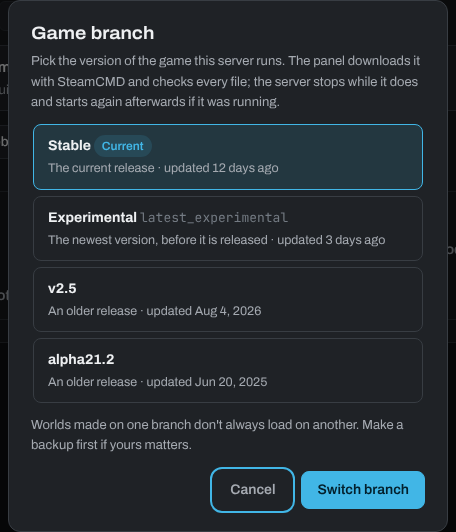
Some games offer other versions on Steam, such as an experimental version or an older release. Click Branch on the Steam update bar, choose the version and click Switch branch. Make a backup first: a world made on a newer version may not load on an older one.
Repairing the game files
- Validate (Steam update bar) or Update and validate files (Settings tab) checks every game file against Steam and repairs what's missing or damaged.
- Fresh game files (Settings tab) deletes the game's own files and downloads them again, keeping your world and settings. Use it when a server crashes as it loads after a branch switch or a broken update.
Mods, plugins and frameworks (uMod, BepInEx, CounterStrikeSharp and so on) are updated on the Mods, Plugins or Updates tab of your game.
Need help? Open a support ticket and we'll take a look.