ChicagoServers β€Ί Knowledgebase

We are your new 5-Star Hosting Company. At least according to Trustpilot

Check out our current game server offerings.

All servers come with a 24-Hour Trial, Free Backups, and 40Gbps DDoS Protection included!

We offer quality support, a detailed knowledgebase, video tutorials on most topics, and even live support in case you prefer a live human πŸ˜‰

Use code SAVE15 to take 15% OFF Your First Invoice with ChicagoServers! Limited Time!

Knowledgebase

How can I boost EXP, Taming Speed, and Harvest Amounts of my server?

44547 views

Your ARK server's XP, taming and harvest multipliers are on the Configs tab of your server in the control panel.

  1. Sign in to the control panel at panel.chicagoservers.co and open your ARK server.
  2. Open the Configs tab and choose Game settings.
  3. Set XP multiplier, Taming speed and Harvest amount. 1 is the game's default; 2 is twice as fast, 3 three times as fast, and so on.
  4. Click Save, then Restart at the top of the page.
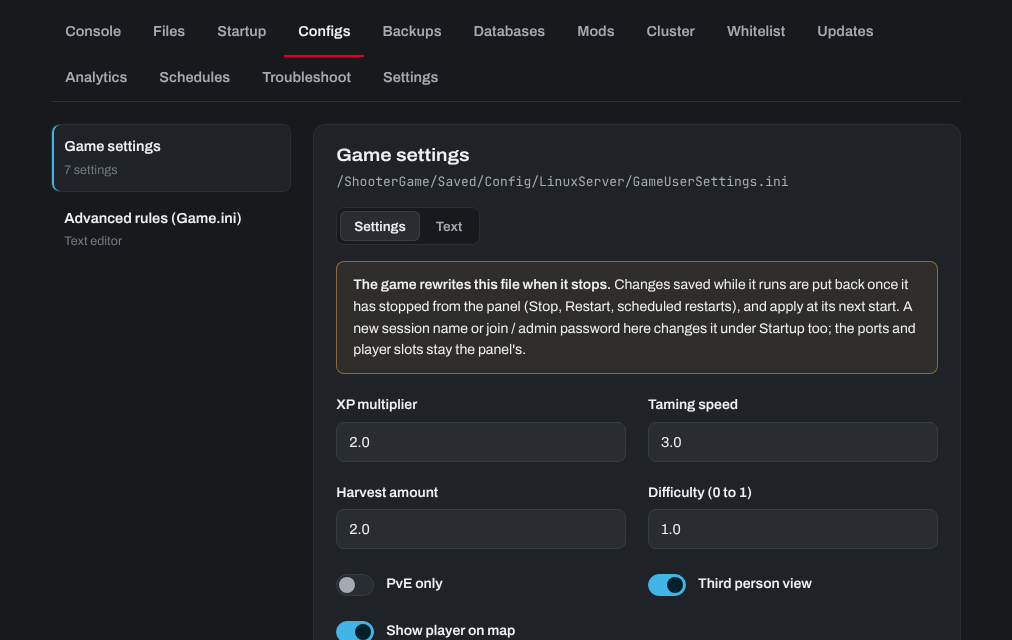
The Configs tab of an ARK server: XP multiplier, taming speed, harvest amount and other game settings

Settings that don't have a field of their own can be added in the file itself: click Text and add them under [ServerSettings].

Need help? Open a support ticket and we'll take a look.


Was this answer helpful?

33
« Back

Processing…