
ARK servers can run with one of the game's seasonal events (such as Fear Evolved or Winter Wonderland), which adds the event's map decorations, creatures and drops. The event must be one the developers have released.
- Sign in to the control panel at panel.chicagoservers.co and open your ARK server.
- Open the Startup tab and choose the event in Active event.
- Click Save startup, then Restart at the top of the page. The event starts with the server.
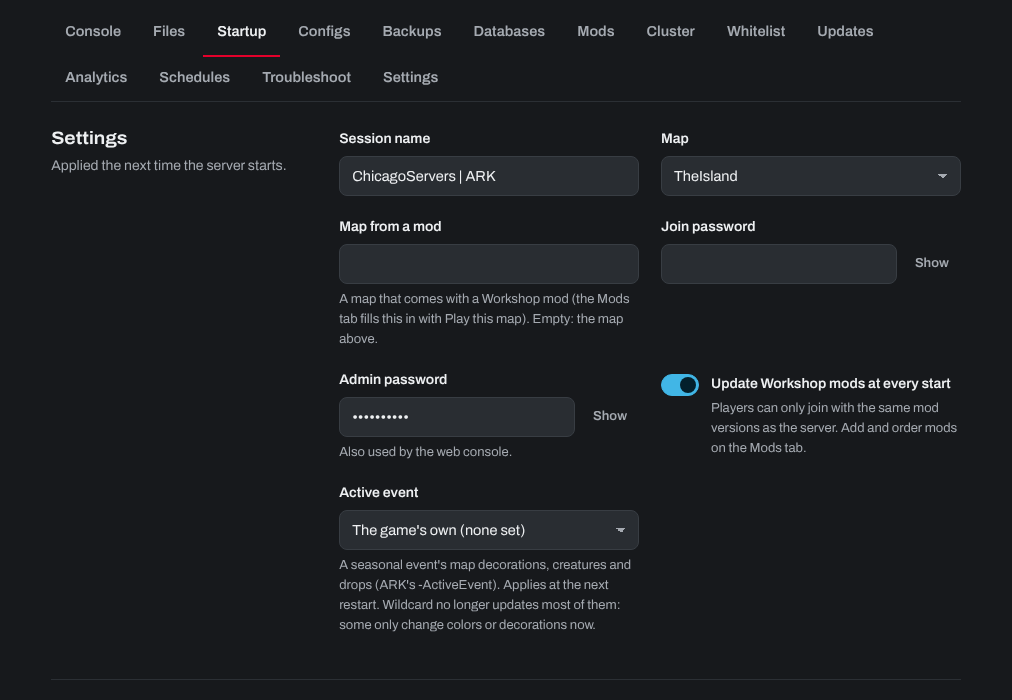
To turn the event off, choose The game's own (none set). Wildcard no longer updates most older events: according to the ARK wiki, only Winter Wonderland still works fully, and the others may only change the colors of wild creatures.
Need help? Open a support ticket and we'll take a look.