
A cluster lets your survivors, items and dinos travel between your ARK maps: upload them at an obelisk, a supply drop or a transmitter on one map and download them on another. You need at least two ARK servers.
Your ARK servers are always set up on the same machine, so any of them can be clustered. If you have an older ARK server that is on another machine, open a support ticket and we'll move it.
- Sign in to the control panel at panel.chicagoservers.co and open one of your ARK servers.
- Open the Cluster tab. Under Start a cluster with this server, type a name for the cluster and click Create.
- Under Add one of your ARK servers on this machine, choose another of your ARK servers and click Add. Repeat for each map you want in the cluster.
- Click Restart running maps (or restart each map). The cluster applies when a map restarts.
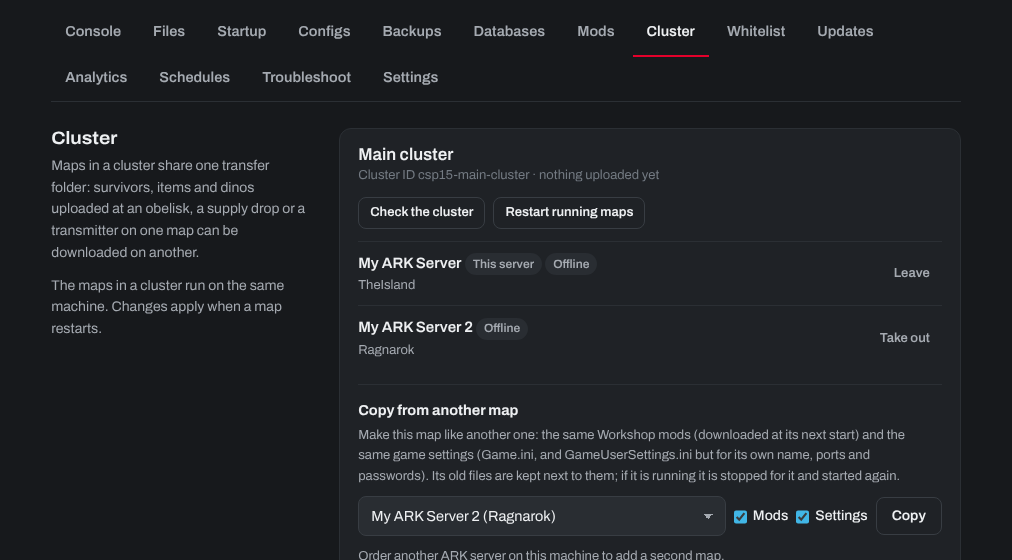
Each map in a cluster should run a different map (for example The Island and Ragnarok). Set each server's map on its Startup tab.
Every map in the cluster needs the same Crossplay (Epic Games) setting and the same game branch, or survivors can't transfer between them. If a transfer doesn't work, click Check the cluster: it lists what keeps a map out and what to do. Under Settings on the Cluster tab you choose whether survivors, items and dinos can transfer.
Need help? Open a support ticket and we'll take a look.