
Installing CurseForge modpacks (the easy way)
- Sign in to the control panel at panel.chicagoservers.co and open your Minecraft server.
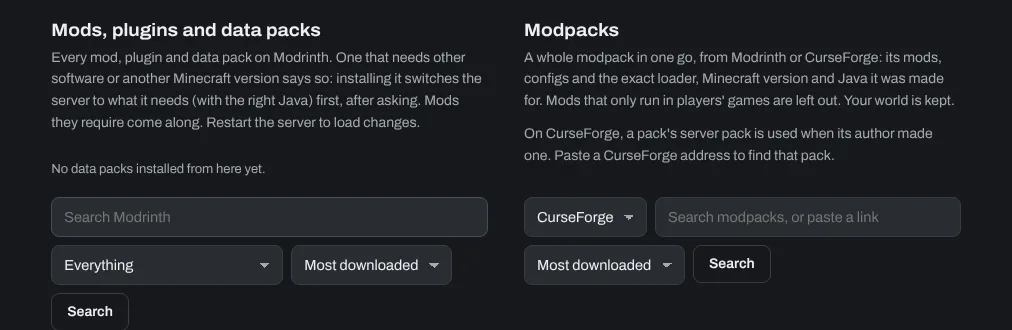
- Open the Mods tab. Under Modpacks, choose CurseForge, search for the modpack you want (or paste its CurseForge address) and click Search.
- Click Choose… next to the modpack, pick the version and click Install this version, then confirm. Leave Move current mods and configs aside first (recommended) ticked.
- The panel installs the modpack together with the right mod loader (Forge, NeoForge or Fabric), Minecraft version and Java version. Progress shows on the tab; when it's done, start the server.
Some mod authors only allow downloads on CurseForge itself. If a pack has such mods, the Mods tab lists them under the pack: download them from CurseForge and upload them to the mods folder on the Files tab.
Want just the Forge mod loader, without a modpack? Under Change software on the same tab, choose Forge (or NeoForge for Minecraft 1.20.2 and newer) and the Minecraft version, and click Install. Your worlds and settings stay.
Installing single Forge mods
The search under Mods, plugins and data packs on the Mods tab looks on Modrinth, where many CurseForge mods are too. Search for the mod and click Install. Mods it needs come along, and if it needs other server software or another Minecraft version, the panel says so and switches the server for you, after asking.
For a mod that's only on CurseForge, download its .jar file for your server's Minecraft version and mod loader from the CurseForge Mods website and upload it to the mods folder on the Files tab (or over SFTP: see How to connect to your server's SFTP).
Restart your server to load new mods. Players need the same mods in their own game too.
Need help? Open a support ticket and we'll take a look.