
Your server's Minecraft version and server software are on the Mods tab. The panel installs any version with the right Java version, and your worlds and settings stay.
- Sign in to the control panel at panel.chicagoservers.co and open your Minecraft server.
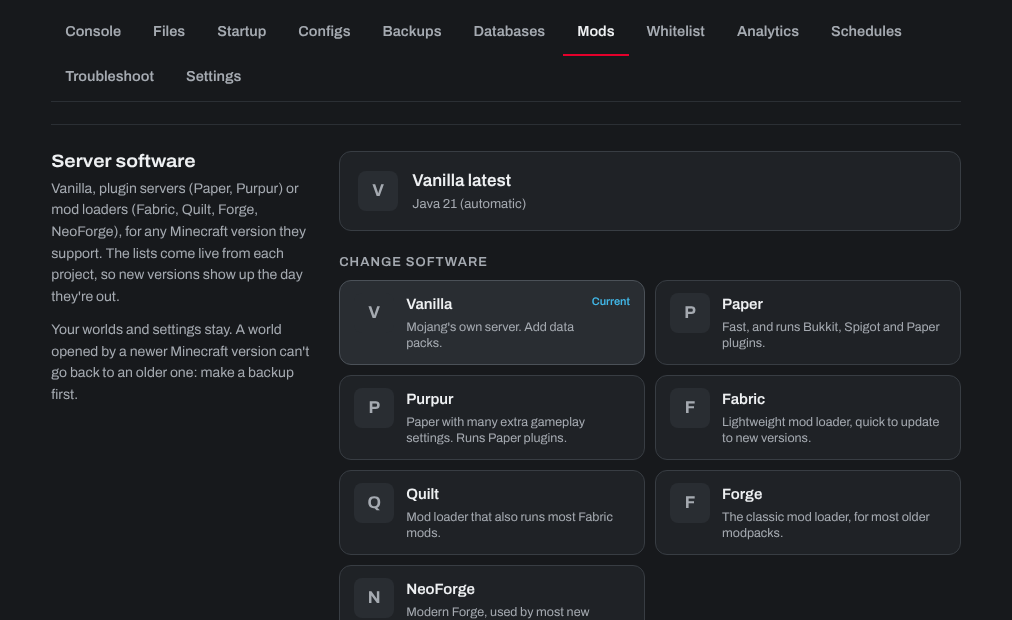
- Open the Mods tab. Under Server software you see what it runs now.
- Under Change software, choose:
- Vanilla: Mojang's own server, with data packs.
- Paper or Purpur: for Bukkit, Spigot and Paper plugins.
- Fabric or Quilt: lightweight mod loaders.
- Forge or NeoForge: for most modpacks (NeoForge for Minecraft 1.20.2 and newer).
- Pick the Minecraft version you want and click Install. Start the server when it's done.
Going back to an older version: a world opened by a newer Minecraft version can't be opened by an older one. Make a backup on the Backups tab before you change version.
Java: the panel picks the Java version Minecraft needs. For an old modpack that needs Java 8, or a mod that needs a newer one, choose it under Java on the same tab and click Save.
Need help? Open a support ticket and we'll take a look.