
Your server's settings (server.properties) are on the Configs tab, as fields you fill in.
- Sign in to the control panel at panel.chicagoservers.co and open your Minecraft server.
- Open the Configs tab and choose Server properties.
- Change what you like, for example:
- Players: max players, whitelist, idle kick, operator permission level.
- Gameplay: difficulty, game mode, hardcore, PvP, flight, command blocks, spawn protection.
- World: the world folder, seed, world type, structures and the Nether.
- Performance: view distance and simulation distance.
- Click Save, then Restart at the top of the page.
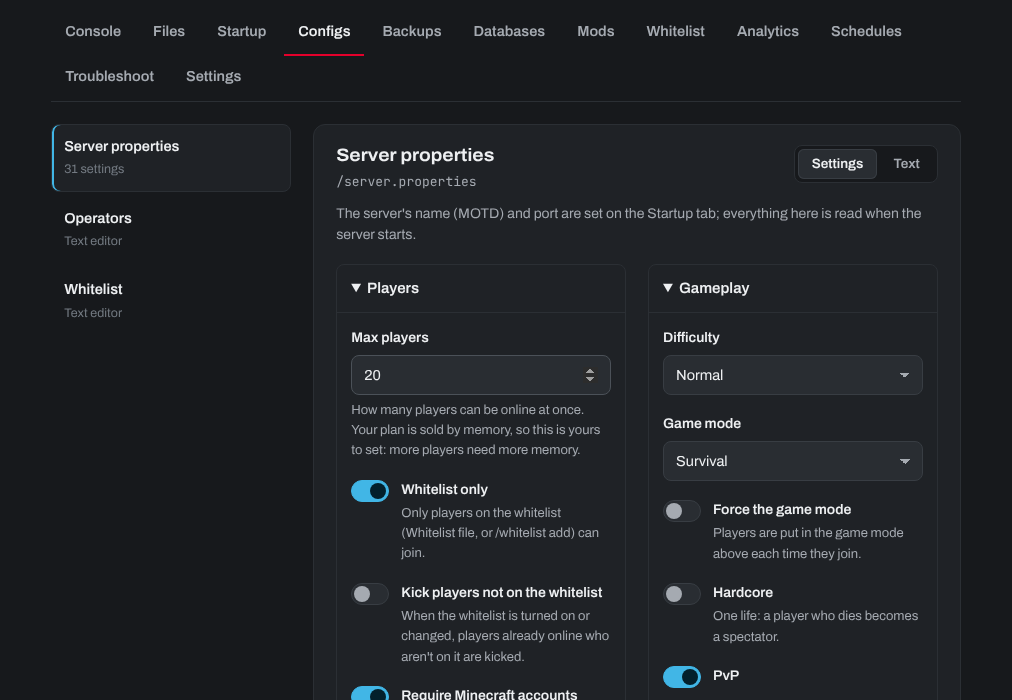
The server's name in the server list (MOTD) is on the Startup tab. Click Text on the Configs tab to edit the whole file instead.
Max players: Minecraft plans are sold by memory, so the player limit is yours to set. More players need more memory.
Need help? Open a support ticket and we'll take a look.