
Startup tab
- Sign in to the control panel at panel.chicagoservers.co and open your FiveM server.
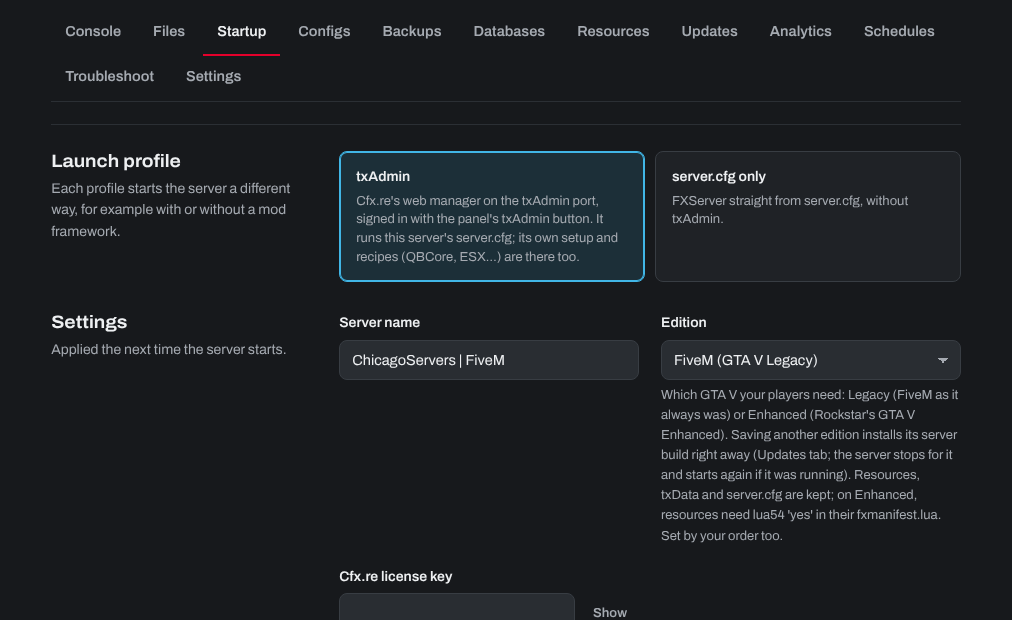
- Open the Startup tab:
- Launch profile: txAdmin (Cfx.re's web manager, opened with the txAdmin button at the top of the page) or server.cfg only (FXServer straight from server.cfg).
- Server name and Cfx.re license key.
- Edition: FiveM (GTA V Legacy), FiveM as it always was, or FiveM for GTA V Enhanced, for players on Rockstar's GTA V Enhanced. Saving another edition installs its server build right away; resources, txData and server.cfg are kept. On Enhanced, resources need
lua54 'yes'in their fxmanifest.lua.
- Click Save startup, then Restart.
Configs tab (server.cfg)
Choose server.cfg on the Configs tab for the project name and description, tags, locale, ScriptHook and OneSync. Click Text to edit the whole file. If you deployed a txAdmin recipe, choose the server.cfg marked In use.
- OneSync: Cfx.re requires it (On or Legacy) for 32 slots or more, and On for more than 64. It's always on with GTA V Enhanced.
- More than 48 players also needs a Cfx.re Element Club subscription on the account that owns your license key.
The ports and slots are kept right for you. The server name and license key are kept in step from the Startup tab in your server's own server.cfg; a txAdmin recipe's server.cfg keeps the ones the recipe wrote, so change those in that file or in txAdmin.
Need help? Open a support ticket and we'll take a look.