
Your server's settings are on the Configs tab (Server settings), in groups. The server name, join password, ports and player slots are on the Startup tab.
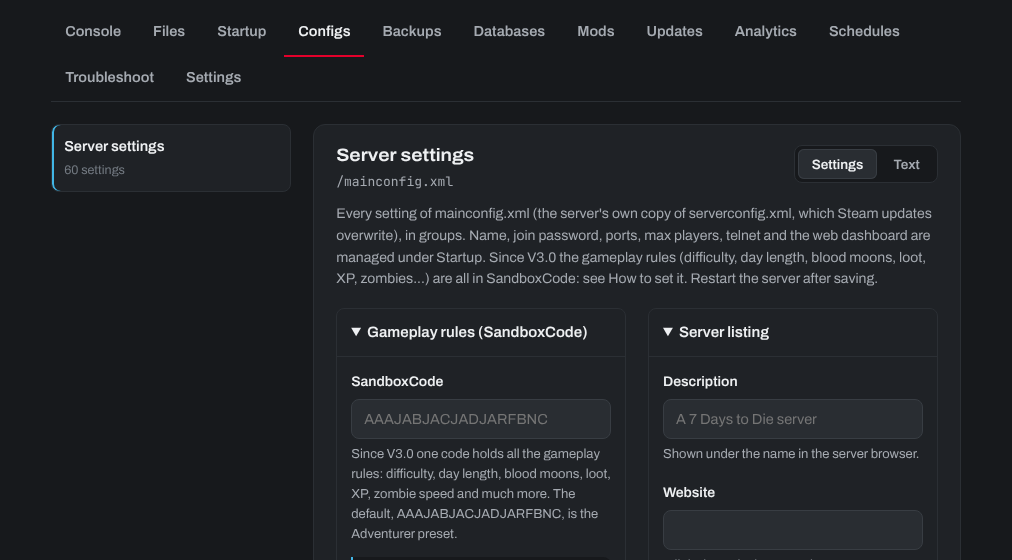
Gameplay rules (V3.0 and later): SandboxCode
Since V3.0, all the gameplay rules (difficulty, day and night length, blood moons, loot, XP, zombie speed and much more) are in one code, the SandboxCode.
- In 7 Days to Die (the same version as the server), open New Game, pick the preset closest to what you want, then open Sandbox Options.
- Set each option. The code at the bottom changes as you go. Copy it with its Copy button: never type or edit its letters by hand.
- In the control panel, open the Configs tab, choose Server settings and paste the code into SandboxCode (under Gameplay rules (SandboxCode)).
- Click Save, then restart the server. The rules apply from the next start; your world is kept.
Keep a note of what you picked: the code can't be read by eye. To check or change it later, paste it into the game's Sandbox Options. After a game update, open the code there and copy it again if anything looks wrong.
On a server with console crossplay, some options have limits: see How to make your 7 Days to Die (7DTD) Server Crossplay Enabled.
Other settings
The other groups cover the server listing (description, website, region), the world (map, seed, size, save name), multiplayer (player killing, spawn), land claims, crossplay and anti-cheat, and performance. Click Save and restart after changing them. Servers on a game version before V3.0 use the settings in Only for game branches before V3.0 (a folded group: click it to open it) instead of the SandboxCode.
Need help? Open a support ticket and we'll take a look.