ChicagoServers β€Ί Knowledgebase

We are your new 5-Star Hosting Company. At least according to Trustpilot

Check out our current game server offerings.

All servers come with a 24-Hour Trial, Free Backups, and 40Gbps DDoS Protection included!

We offer quality support, a detailed knowledgebase, video tutorials on most topics, and even live support in case you prefer a live human πŸ˜‰

Use code SAVE15 to take 15% OFF Your First Invoice with ChicagoServers! Limited Time!

Knowledgebase

How to make yourself the owner or an admin on your Unturned server

38 views

  1. Find your SteamID64 (17 digits, starting with 7656119) at steamid.io.
  2. Sign in to the control panel at panel.chicagoservers.co and open your Unturned server.
  3. Open the Startup tab and paste it into Owner SteamID64. The owner is an admin on the server.
  4. Click Save startup, then Restart at the top of the page.
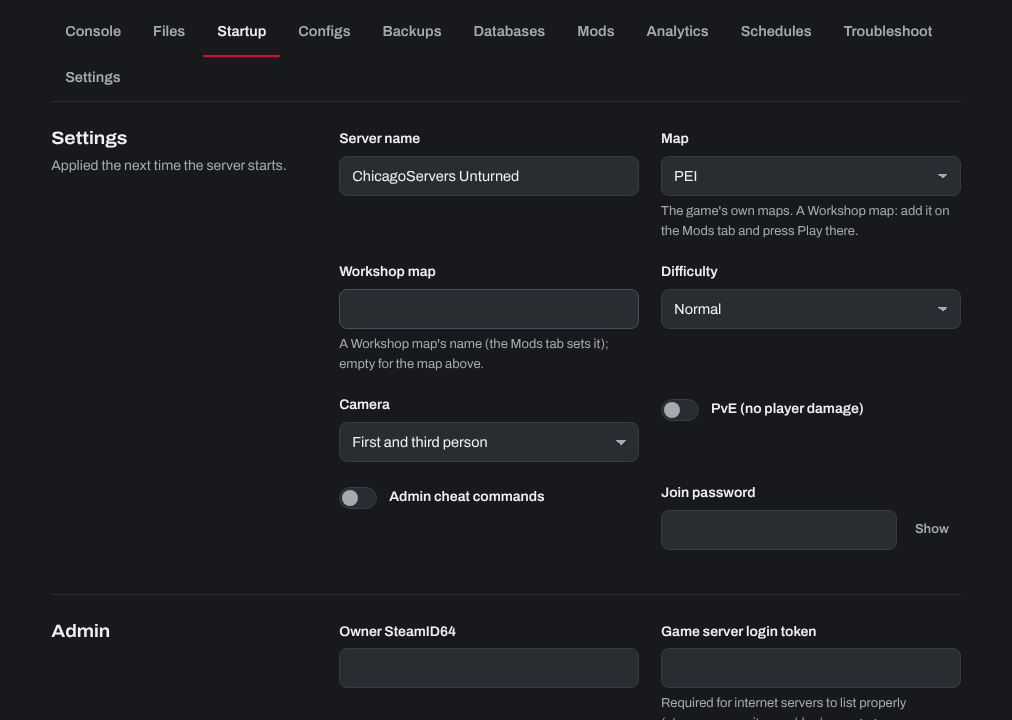
The Startup tab of an Unturned server: name, map, difficulty, camera, PvE, password, owner and login token

To make other players admins, type admin PlayerName (or their SteamID64) on the Console tab while they're on the server. To remove one, type unadmin PlayerName. The admin list is also on the Configs tab (Admins).

Turn on Admin cheat commands on the Startup tab to let admins use cheat commands such as giving items.

Need help? Open a support ticket and we'll take a look.


Was this answer helpful?

« Back

Processing…