
Your Unturned server's main settings are on the Startup tab.
- Sign in to the control panel at panel.chicagoservers.co and open your Unturned server.
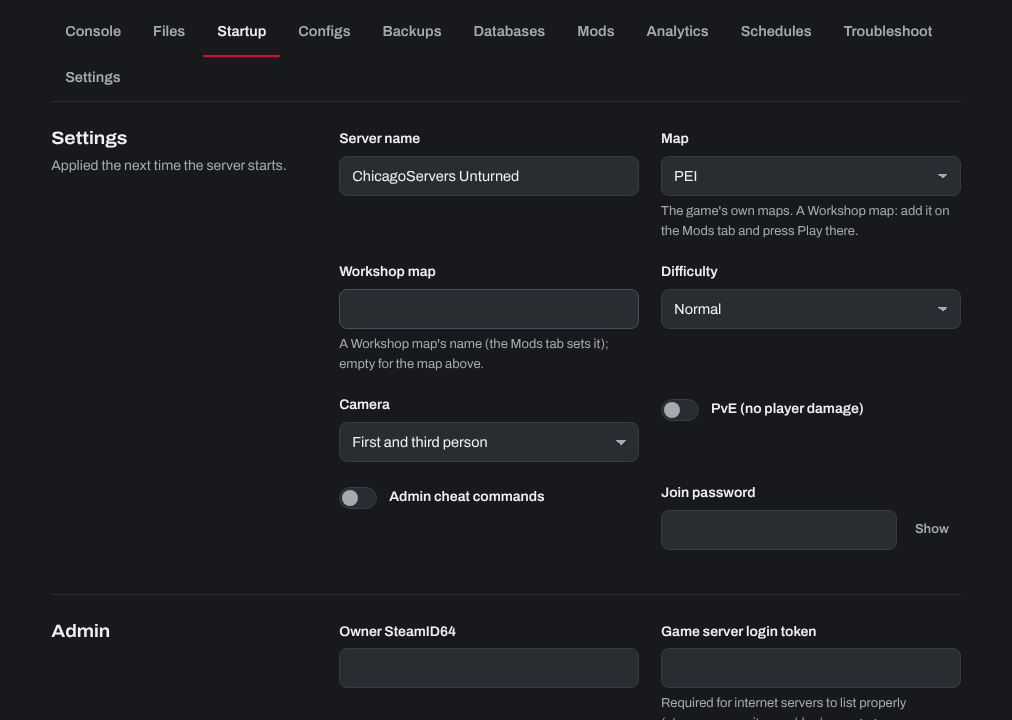
- Open the Startup tab and change what you like:
- Server name and Welcome message.
- Map: one of the game's maps. For a Workshop map, add it on the Mods tab and press Play there.
- Difficulty, Camera (first person, third person or both) and PvE (no player damage).
- Join password and Owner SteamID64.
- Game server login token: needed for internet servers to list properly. Make one at steamcommunity.com/dev/managegameservers with App ID 304930.
- Click Save startup, then Restart at the top of the page.
More settings are on the Configs tab: Config.json (the game's own rules, created on first start) and Commands.dat for other server commands.
Need help? Open a support ticket and we'll take a look.