
What is a FiveM license key?
Every FiveM server needs a Cfx.re license key (Cfx.re also calls it a server registration key). It's tied to your own Cfx.re account, so hosting companies can't make one for you. The old Keymaster site is now part of the Cfx.re Portal.
Make a Cfx.re account
If you don't have a Cfx.re account yet, sign up on the Cfx.re forum. Use an email address you can get to, and confirm it from the email Cfx.re sends you.

Get your license key
- Go to the Cfx.re Portal at portal.cfx.re and sign in with your Cfx.re account. (keymaster.fivem.net takes you there too.)
- Open Servers, then Server Registration Keys.
- Create a new key. Fill in what the form asks for: the name is just so you know which key belongs to which server.
- Generate the key, then copy it from your list of keys. It starts with
cfxk_.

Keep your key private: anyone who has it can run a server with it.
Apply the key to your server
- Sign in to the control panel at panel.chicagoservers.co and open your FiveM server.
- Open the Startup tab.
- Paste the key into Cfx.re license key and click Save startup. The panel puts it in your server.cfg for you.
- Click Restart at the top of the page. Once the server is back online, the new key is active.
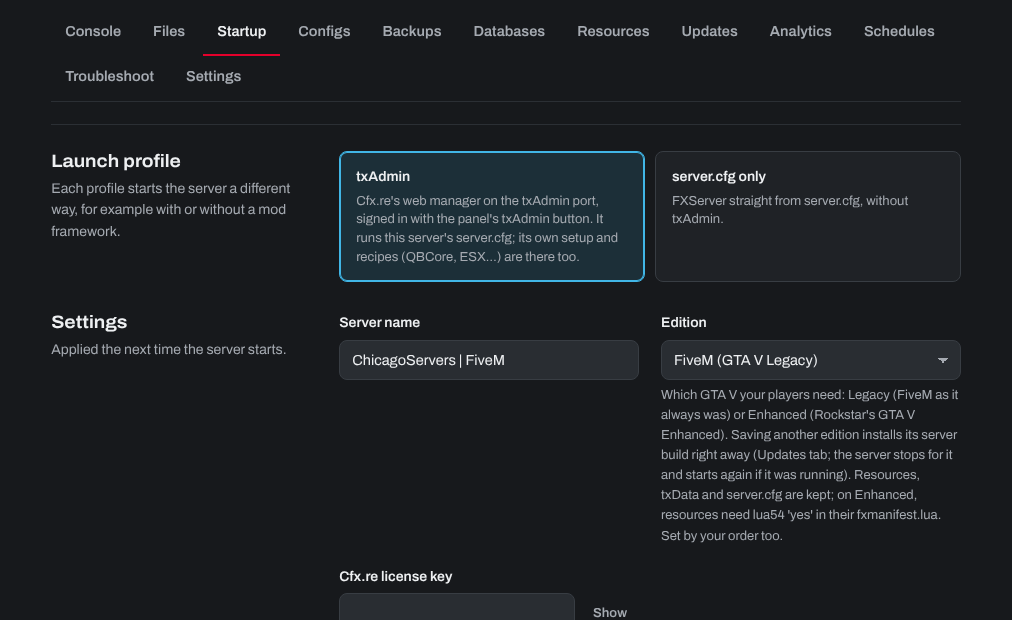
If you use txAdmin, you can also enter the key in txAdmin's setup.
Need help? Open a support ticket and we'll take a look.