
- Sign in to the control panel at panel.chicagoservers.co and open your BeamMP server.
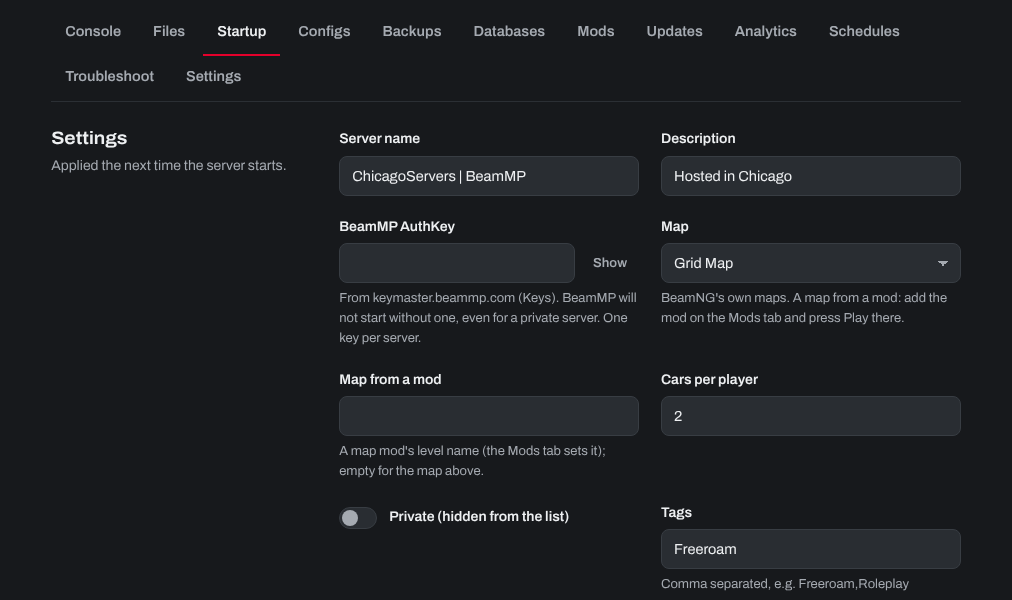
- Open the Startup tab and change what you like:
- Server name, Description and Tags (comma separated, such as Freeroam,Roleplay): what players see in the server list.
- Map: one of BeamNG's own maps. A map from a mod is set from the Mods tab (press Play there).
- Cars per player: how many vehicles each player can spawn.
- Private (hidden from the list): players then join with your server's address.
- Server version (Admin):
latest, or a release such asv3.4.1. Run an update after changing it.
- Click Save startup, then Restart at the top of the page.
Your server's ServerConfig.toml is on the Configs tab too. For mods and custom maps, see How to install mods on your BeamMP Server.
Need help? Open a support ticket and we'll take a look.