
ChicagoServers has moved from TCAdmin to its own control panel at panel.chicagoservers.co. Your servers, files, worlds and settings came across with them, and you sign in with the same username and password as before.
Where things are now
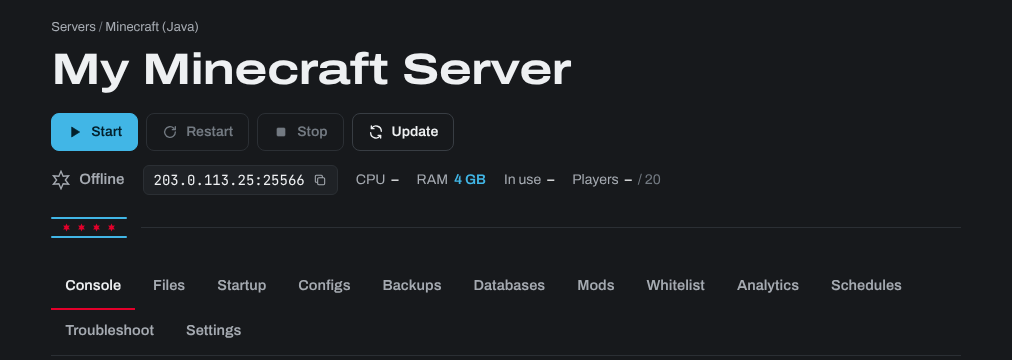
Open a server from Your servers. Everything for that server is on the tabs of its page:
- Command Line Manager is now the Startup tab: server name, map, passwords and the other start settings are fields you fill in. There is nothing to tick, save as a new command line or select.
- Configuration Files is now the Configs tab: common settings are fields, and Text edits the whole file.
- File Manager is now the Files tab, and FTP is now SFTP (the SFTP button on the Files tab).
- Scheduled Tasks is now the Schedules tab.
- Steam Updater is now the Steam update bar at the top of the server's page, with Update now and (on games that have branches) the Branch button.
- Mod Manager, uMod and Workshop installers are now your game's own tab: Mods on most games, Plugins on Rust (uMod or Carbon included), Resources on FiveM and CS2 on Counter-Strike 2. Other add-on installers are on the Updates tab.
- Service Settings and Reinstall are now on the Settings tab.
- Web Console is now the Console tab.
- MySQL Manager is now the Databases tab, and Sub-Users is Sub-users in the menu on the left.
What's new
- Backups: automatic and one-click backups, and restoring them yourself.
- Analytics: players and CPU (and RAM on Minecraft) over the last day, week or months.
- Troubleshoot: checks your server and tells you why it crashes or why players drop.
- Two-factor authentication for your account.
The articles in this knowledgebase have been updated for the new panel. Start with Your server's page: start, stop, console and status.
Need help? Open a support ticket and we'll take a look.