
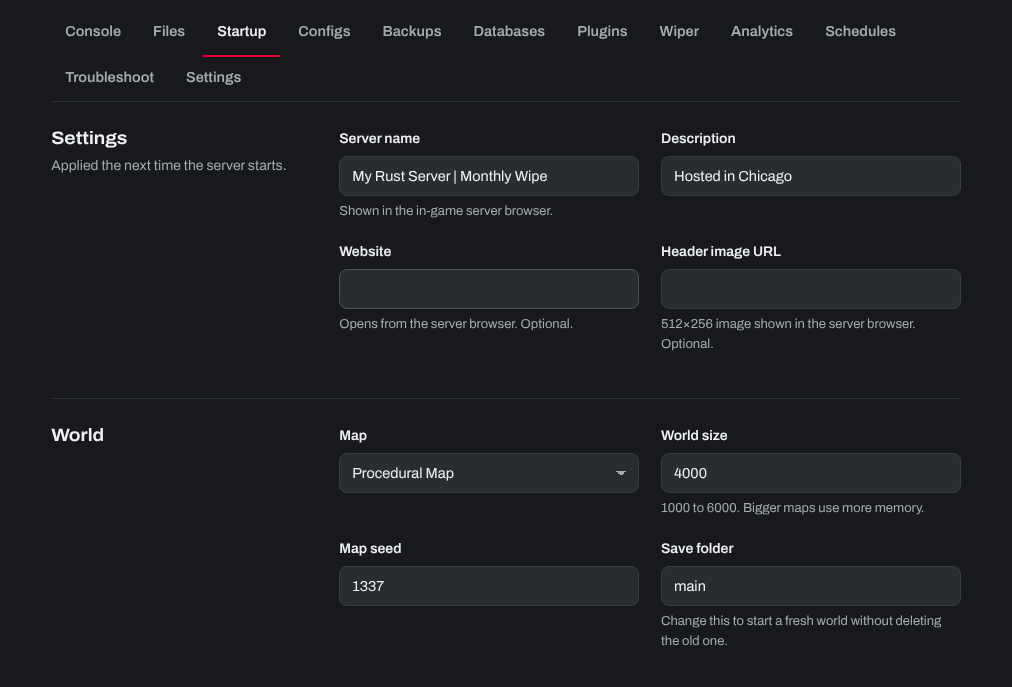
Your Rust server's main settings (its map, world size, seed and RCON password, and its name and description) are on the Startup tab of your server in the control panel. There is nothing to tick: every setting is a field you fill in.
- Sign in to the control panel at panel.chicagoservers.co and open your Rust server.
- Open the Startup tab.
- Under World:
- Map seed: any number. The same seed and world size always make the same map.
- World size: from 1000 to 6000. Bigger maps use more memory.
- Map: Procedural Map (made from the seed and size), or one of Rust's fixed maps such as Barren or Hapis Island.
- Save folder: change it (for example to
main2) to start a fresh world while keeping the old one; set it back to return to it.
- Under Admin, the RCON password is the password RCON tools (such as RustAdmin) use to connect. The control panel's own console doesn't need it.
- Click Save startup, then Restart at the top of the page. The new settings apply when the server starts.
Changing the seed, world size or map makes a new map. Bases built on the old map are not on the new one. To keep your current world, leave these as they are.
Need help? Open a support ticket and we'll take a look.