
Startup tab
- Sign in to the control panel at panel.chicagoservers.co and open your Soulmask server.
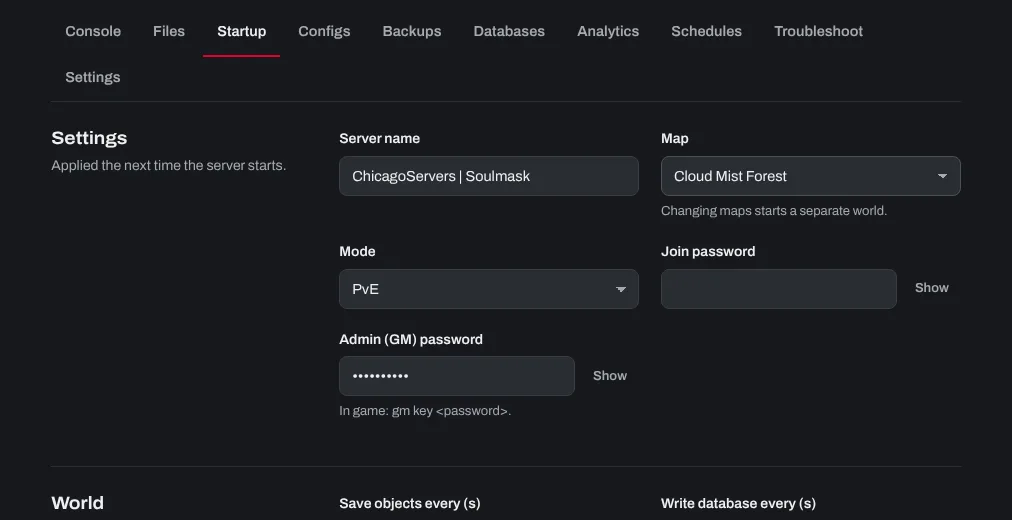
- Open the Startup tab: Server name, Map, Mode (PvE or PvP), Join password, Admin (GM) password, and how often the world is saved.
- Click Save startup, then Restart.
Rates and rules (GameXishu.json)
- Click Stop at the top of the page. The game rewrites this file when it shuts down, which would undo changes made while it runs.
- Open the Configs tab and choose Gameplay settings (GameXishu.json). It's created when the server first starts.
- The file holds three numbered groups of settings; dedicated servers use group 1. Change the values you want there (experience, gathering, taming, day length and so on).
- Click Save, then Start the server.
Mods and clusters
Workshop mods and cluster settings are on the Startup tab too. See How to add Workshop mods to your Soulmask server and How to set up a Soulmask server cluster.
Need help? Open a support ticket and we'll take a look.