
With admin (GM) access on your Soulmask server you can open the GM panel and use GM commands to manage players, teleport, unlock technology and more.
Set your GM password
- Sign in to the control panel at panel.chicagoservers.co and open your Soulmask server.
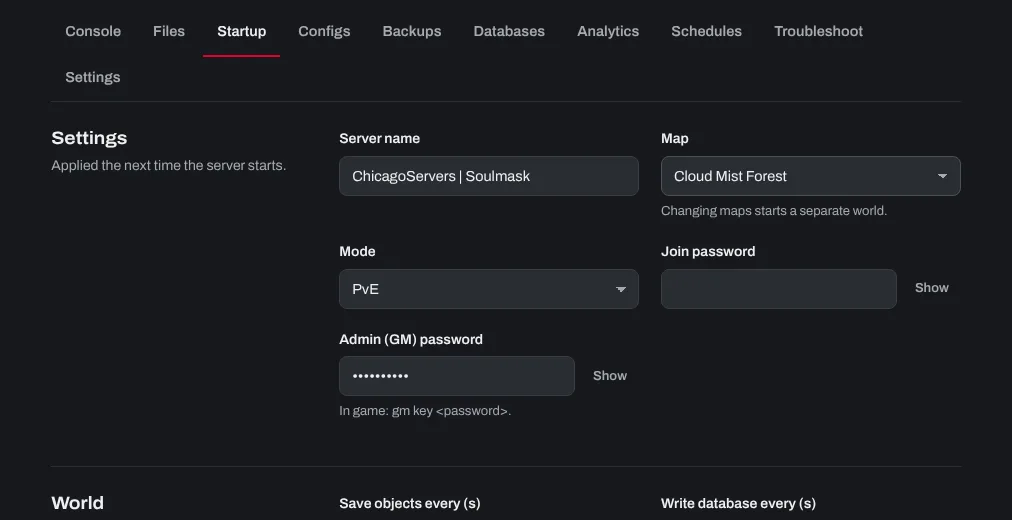
- Open the Startup tab and type a password in Admin (GM) password (up to 32 characters).
- Click Save startup, then Restart at the top of the page.
Log in as GM in the game
- Join your server.
- Press
~(tilde) to open the console. If nothing opens, check the console key in the game's key bindings. - Type
gm key YourPassword, with your GM password, and press Enter. - The GM panel opens on the right of your screen. It has the most common admin tools.
You need to do this again each time you join. To type more commands, press ~ again.
GM commands
Type these in the in-game console after gm key. They are case-sensitive.
- Open the GM panel (log in as admin):
gm key [password] - Add experience:
gm AddExp [value] - Add mask experience:
gm Addmjexp [value] - Add hunting experience:
gm AddShouLieExp [value] - Reset skill points:
gm XiDian - Kill yourself:
gm ZiSha 1 - Revive:
gm FuHuo - Delete your character (can't be undone):
gm shanhao - Show your coordinates:
GPS - Recruit the NPC you're aiming at:
gm ZhaoMu - Teleport to coordinates:
gm Go [x] [y] [z] - Clear all NPCs:
gm ClearAllNpc - Remove the selected target:
gm ClearSelect - Respawn plants nearby:
gm ShuaXinZhiBei - Show your own info (skills, talents):
gm ShowInfo 1 - Show the targeted character's info:
gm ShowInfo 0 - Turn invisibility on / off:
gm SetAttr YinShen 1/gm SetAttr YinShen 0 - Repair mask nodes:
gm JSMJ - Reveal the whole map:
gm ShowMap - Unlock all technology:
gm KeJiShu - Show the barbarian invasion heat map:
gm ShowReDu - Clear all invasion heat:
gm ClearAllReDu - Add invasion heat where you are:
gm AddReDu [value] - Reset the tutorial missions:
gm ChongZhiRenWu - Show / hide server status (ping, FPS):
Debuginfo 1/Debuginfo 0
Server commands in the control panel
The Console tab sends commands to the server itself once the world has loaded, for example help to list them, or shutdown 300 to warn players and stop the server in 5 minutes.
Tips
- Use a strong GM password and don't share it with regular players.
- If
gm keydoesn't work, check the Admin (GM) password on the Startup tab, and restart the server after changing it.
Need help? Open a support ticket and we'll take a look.