
Your Hytale server's main settings are on the Startup tab.
- Sign in to the control panel at panel.chicagoservers.co and open your Hytale server.
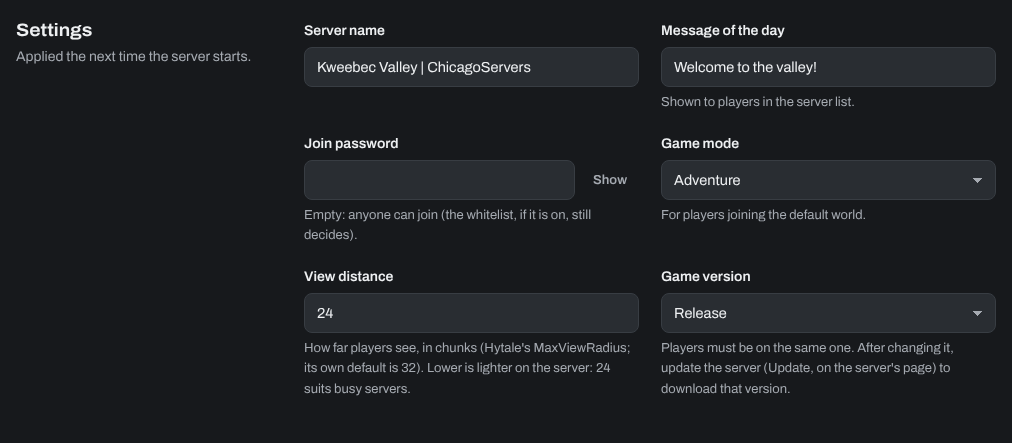
- Open the Startup tab and change what you need:
- Server name: the name players see.
- Message of the day: shown to players in the server list.
- Join password: leave it empty so anyone can join.
- Game mode: Adventure or Creative, for players joining the default world.
- View distance: how far players see, in chunks. Lower is lighter on the server: 24 suits busy servers, and Hytale's own default is 32.
- Game version: Release or Pre-release (see How to update your Hytale server and switch to the pre-release).
- Click Save startup, then Restart at the top of the page.
The player limit comes with your plan and is set for you.
More settings
The Configs tab has Hytale's settings file, Server settings (config.json), with World players join (the world in universe/worlds new players start in) and a few network settings. Stop the server before you change this file, so Hytale can't overwrite your changes. The settings from the Startup tab are written into it at every start, so change those on the Startup tab.
The Configs tab also has the whitelist, permissions and bans files. It's easier to change those with commands on the Console tab: see How to make yourself an operator, use the whitelist and ban players on your Hytale server.
Need help? Open a support ticket and we'll take a look.