
Enshrouded's difficulty and world rules (enemy strength, resources, day length and more) are in its server settings file, which you can edit on the Configs tab.
- Sign in to the control panel at panel.chicagoservers.co and open your Enshrouded server.
- Stop the server. The game rewrites the file when it shuts down, so changes made while it runs are lost.
- Open the Configs tab and choose Server settings (enshrouded_server.json).
- Choose a Difficulty preset: Default, Relaxed, Hard or Survival. To set each value yourself, choose Custom and change the settings below it.
- Click Save, then start the server.
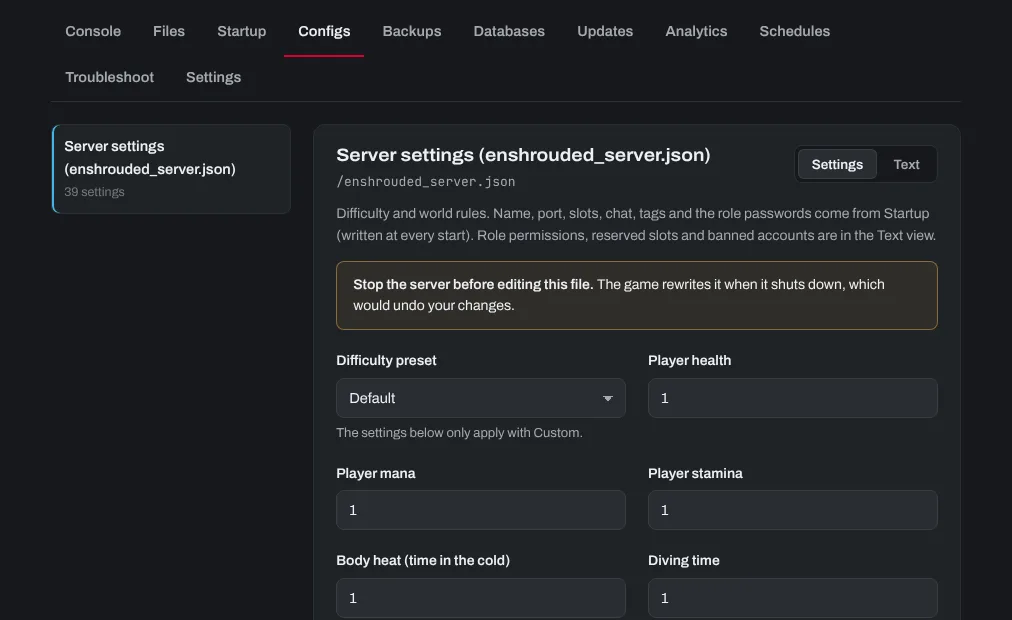
The settings below the preset only apply with Custom. Values are multipliers: 1 is the normal game, 2 twice as much.
The server's name, slots, chat and role passwords come from the Startup tab and are written into this file at every start, so change those there. See Roles and passwords on your Enshrouded server.
Need help? Open a support ticket and we'll take a look.