
Enshrouded servers use roles instead of a single password: the password a player enters decides what they can do. You set them on the Startup tab.
- Sign in to the control panel at panel.chicagoservers.co and open your Enshrouded server.
- Open the Startup tab. Under Roles, set a password for each role you want to use (click Show to see one).
- Click Save startup, then Restart at the top of the page.
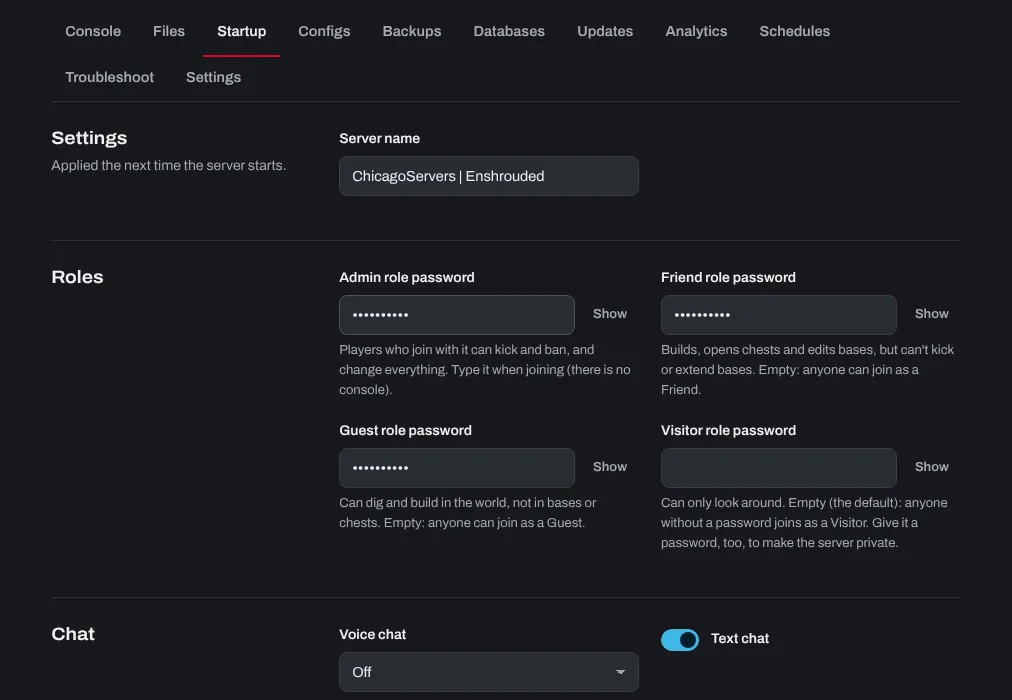
- Admin: can kick and ban players and change everything. Give it only to people you trust.
- Friend: can build, open chests and edit bases, but can't kick players or extend bases.
- Guest: can dig and build in the world, but not in bases or chests.
- Visitor: can only look around.
A role with an empty password lets anyone join as that role. With the Visitor password empty (the default), anyone can join as a visitor: give it a password too to make the server private.
To see every role, its password and what it may do in one place, open the Updates tab and click Install next to Show the roles and passwords. The list appears on the Console tab.
Kicking and banning players
Enshrouded servers have no console commands. Join with the Admin password, open the player list in the game, and kick or ban from there.
Other settings on the Startup tab
Server name is the name in the server list. Under Chat, choose voice chat (off, nearby players or everyone) and turn text chat on or off. Server browser tags help players find your server.
Need help? Open a support ticket and we'll take a look.