
Your Terraria server's settings are on the Startup tab in the control panel.
- Sign in to the control panel at panel.chicagoservers.co and open your Terraria server.
- Open the Startup tab and change what you need (see below).
- Click Save startup, then Restart at the top of the page.
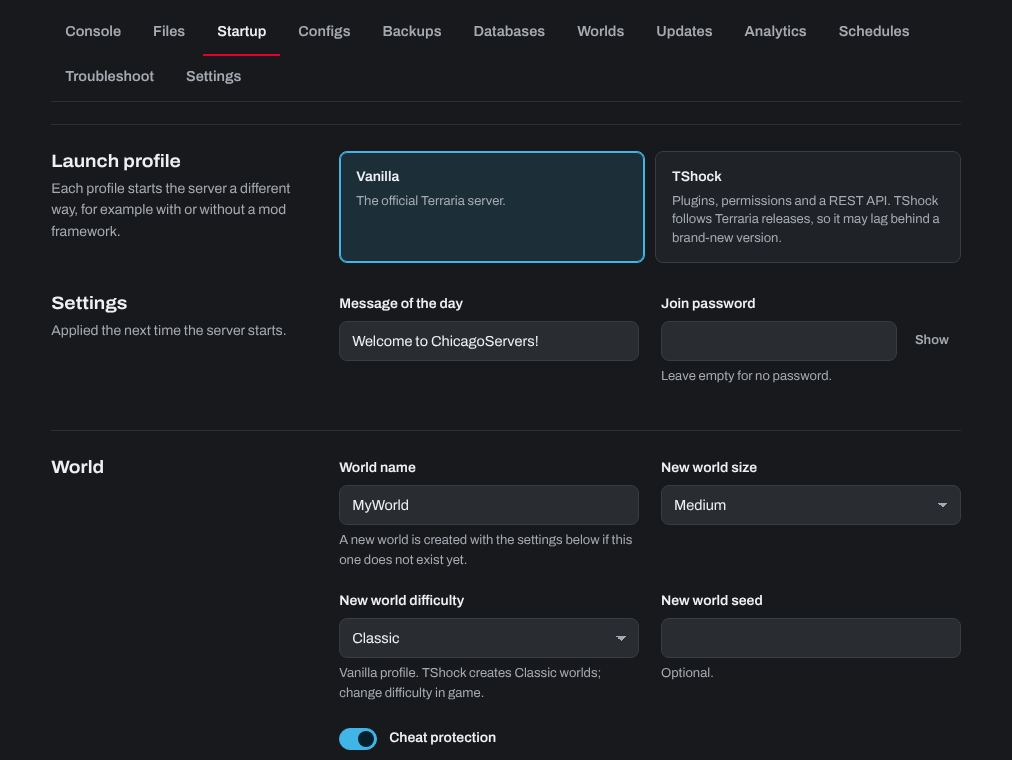
- Launch profile: Vanilla (the official Terraria server) or TShock (plugins, permissions and admin commands). See How to use TShock on your Terraria server.
- Message of the day: shown to players when they join.
- Join password: leave it empty for a server anyone can join.
- World name: the world the server plays. If no world with that name exists yet, a new one is made at the next start with the New world size, New world difficulty and New world seed below it. These three only matter when a world is made: changing them doesn't change a world you already have.
- Cheat protection: keeps players from joining with edited characters and items.
- Terraria version (under Admin):
latest, or a version number (see below).
On the TShock profile, the difficulty, seed and cheat protection settings aren't used: TShock makes Classic worlds and has its own settings.
Language and process priority are on the Configs tab, under Server config (Vanilla profile). The Ban list is there too.
Updating to a new Terraria version
When a new Terraria version comes out, update the server so players on the new version can join. It's a good idea to make a backup on the Backups tab first.
- Check that Terraria version on the Startup tab is
latest. - Click Update at the top of your server's page. The server downloads the newest Terraria server.
To install a particular version instead, open the Updates tab, find Terraria server version, type the version under Build as a number without the dots (Terraria 1.4.5.8 is 1458) and click Install. Check the number before you click: an older number puts the server on an older version, and players on the newest version can't join it.
The server stops while it installs. Your worlds and settings are kept. On the TShock profile, see How to use TShock on your Terraria server for updating TShock.
Need help? Open a support ticket and we'll take a look.