
- Sign in to the control panel at panel.chicagoservers.co and open your Garry's Mod server.
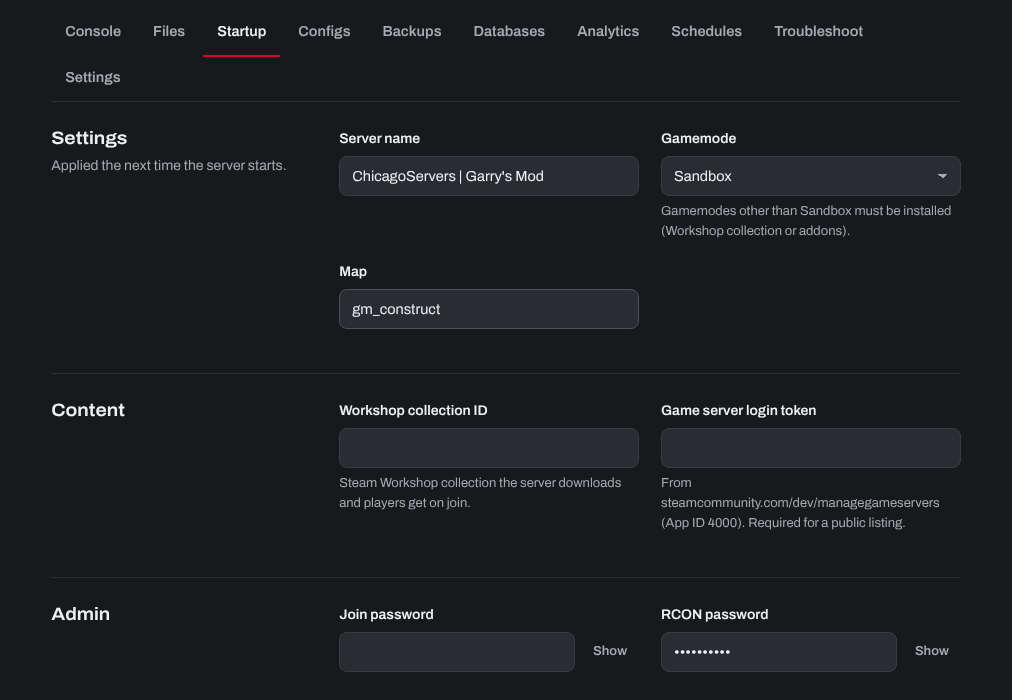
- Open the Startup tab and change what you like:
- Server name.
- Gamemode: pick one from the list, or choose Other (type it in)… and type the gamemode's folder name (as in
garrysmod/gamemodes). The gamemodes already on your server are listed first, under On this server. Sandbox and Trouble in Terrorist Town come with the game; others, such as DarkRP, Murder, Prop Hunt or Cinema, must be in your Workshop collection or uploaded as an addon. A note under the box tells you if the one you chose isn't on the server yet. - Map: the map the server starts on. The maps on your server are listed first: the ones in
garrysmod/maps, your addons, your Workshop collection and mounted game content such as CS:S. Or choose Other (type it in)… and type the map's name without.bsp, such asgm_construct. - Workshop collection ID: the addons the server downloads.
- Game server login token: recommended, because a server without one ranks much lower in the server list. Make one at steamcommunity.com/dev/managegameservers with App ID 4000 (your Steam account must own Garry's Mod).
- Click Save startup, then Restart at the top of the page.
To change the map while the server runs, type changelevel mapname on the Console tab. More settings (loading screen, max props, noclip, region, FastDL) are on the Configs tab (server.cfg), and the game's admin list is there under Admins (users.txt).
Need help? Open a support ticket and we'll take a look.