
Mods add to or change Palworld. This guide covers which mods work on your server, and how to install them on the server and on players' PCs.
Which mods work on our servers
Our servers run the Linux version of the Palworld server. That decides which mods can run on it:
- .pak mods (a
.pakfile you copy into the game) are the kind we support. - Mods that need RE-UE4SS (Lua or Blueprint mods, often in a
LogicModsorModsfolder) or a loader built on it don't run on our servers: RE-UE4SS for Palworld is made for Windows. - Palworld's official mod support, with mods from the Steam Workshop, loads server-side mods only on Windows servers, so these don't run on ours either. Players can still use Workshop mods that only change their own game.
- Mods that run programs (
.exeor.dllfiles) aren't supported, for security.
Good places to find mods are Nexus Mods and CurseForge. A mod's page usually says whether it's for the server, for players, or both.
Before you start
- Make a backup on the Backups tab first (see How do I backup my server?). ChicagoServers isn't responsible for damage that mods do to your server files or world.
- Check that the mod works with the current version of Palworld. Game updates often break mods, and an outdated mod can damage a world: remove mods before updating and add them back once their authors support the new version.
- Xbox and PlayStation players can't install mods. If a mod has to be installed by every player, they can't play on your server.
Install a .pak mod on the server
- Sign in to the control panel at panel.chicagoservers.co and open your Palworld server. Click Stop.
- Download the mod to your PC. If it comes in a .zip or .rar file, unzip it to get the
.pakfile. - Open the Files tab and go to
Pal/Content/Paks. Click Upload and choose the.pakfiles, or drag them onto the page. You can also use an SFTP program such as FileZilla: see How to connect to your server's SFTP.
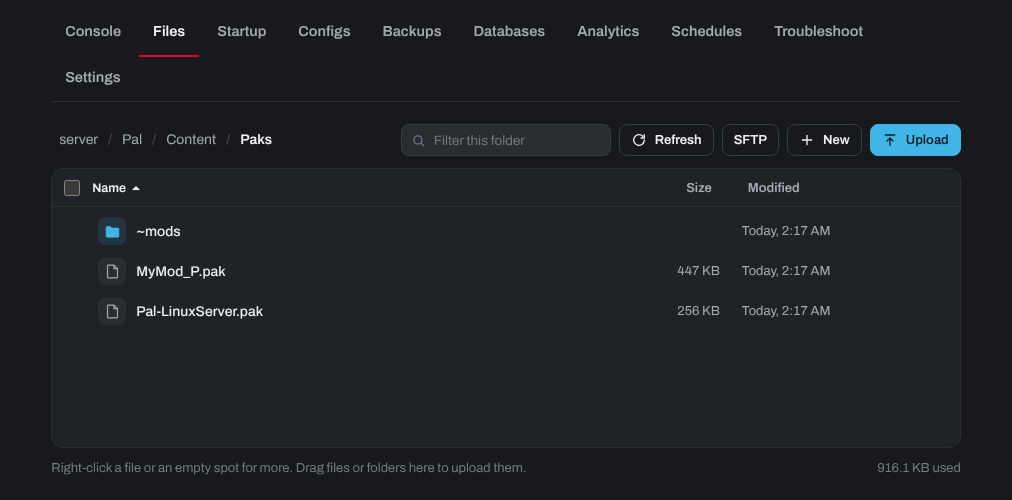
- Click Start.
Install a mod on players' PCs
Mods that only run on the server need nothing from players. Mods that players must also have aren't downloaded automatically when they join, so each player installs them:
- In Steam, right-click Palworld and choose Manage > Browse local files.
- Open
Pal/Content/Paksand copy the mod's.pakfiles into it. - Start Palworld and connect to your server. See How to connect to your Palworld Server.
If a mod doesn't work
- Check the mod supports your Palworld version, and that it doesn't need RE-UE4SS.
- Restart the server after adding or removing mods.
- If the server won't start, remove the mod you added last. The Troubleshoot tab can show the error: see My server won't start or keeps crashing: using the Troubleshoot tab. For errors in the mod itself, ask its author.
Need help? Open a support ticket and we'll take a look.