
Settings that aren't on the Startup tab go in your server's server.cfg, on the Configs tab. The common ones are fields you fill in.
- Sign in to the control panel at panel.chicagoservers.co and open your Rust server.
- Open the Configs tab and choose Server settings.
- Change what you like, for example PvE mode, Decay speed (1 is normal, 0 turns decay off), Radiation, Instant crafting, how long dropped items stay, and the server browser tags.
- Click Save, then Restart at the top of the page.
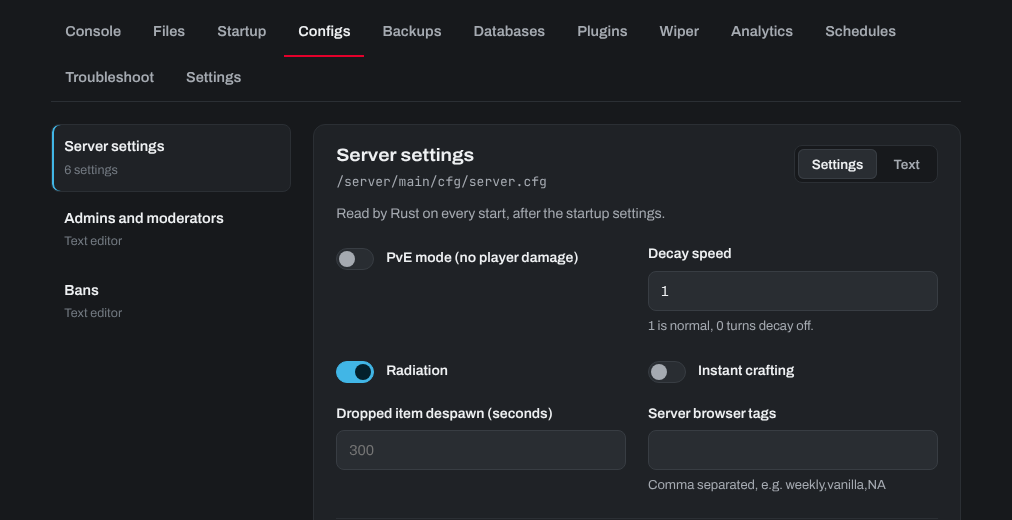
Click Text to add any other server variable, one per line, for example server.tickrate 30. Set the name, map, world size and seed on the Startup tab, not here: Rust reads server.cfg after the startup settings, so a value here would replace the Startup tab's.
Server.cfg belongs to your save folder (Startup tab), so a new save folder starts with an empty one. Admins and moderators (users.cfg) and bans are on the Configs tab too.
Need help? Open a support ticket and we'll take a look.